Fence Quote Template
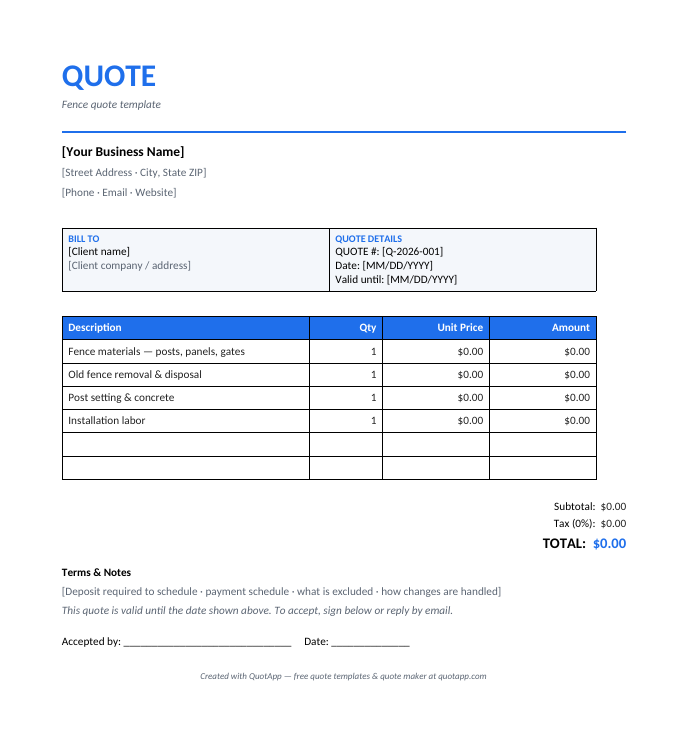
A fence quote template helps you price jobs quickly and look professional when you send it. Quote materials, post setting and labor per linear foot with total clarity. Download it free below, or build your quote online in seconds with the QuotApp quote maker.
⬇ Free download — no sign-up
- Fence Quote Template (Word) — Pre-filled with industry line items
- Quote Template (Excel, auto-calculating)
- Quote Template (PDF)
Create this quote online — free Browse all templates
What's included in this template
- Line items tailored to fence work: fence materials, old fence removal, post setting & concrete, installation labor
- Separate labor and materials sections
- Taxes, discounts and grand total calculated clearly
- Terms, validity period and acceptance signature block
- Available in Word, Excel, Google Docs and PDF
How to use it
- Download the template or open the online quote maker.
- Add your business name, logo and contact details.
- Fill in your client's details and a unique quote number.
- List each item or service with quantity and unit price — the totals do the talking.
- Set a validity date, add your terms, export to PDF and send it.
Frequently asked questions
What should a fence quote include?
A professional fence quote should include your business details, the client's information, a quote number, an itemized breakdown of fence materials, old fence removal, post setting & concrete, taxes, the total price, a validity period, and your terms.
How do I price a fence job?
Estimate materials at cost plus your markup, calculate labor hours at your hourly rate, add overhead and your profit margin. The template separates each part so clients can see exactly what they are paying for.
Quote or estimate — which should I send?
Send a quote when you can commit to a fixed price; send an estimate when the final cost may change. A quote is generally binding once accepted, while an estimate is an educated approximation.
Related quote templates
Skip the template. Build it online.
The free QuotApp quote maker fills in the math, formats everything professionally, and gives you a ready-to-send PDF in under a minute.
Create a free quote now